Your App Download Has Started!
You're almost ready to play.
← Return to Messenger
View the Username and Password you already claimed, then log in and enjoy the game!
Installing on Android
- The .apk file should start downloading automatically.
- When your browser asks, allow installs from this source (a one-time permission).
- Open the downloaded file and tap Install, then launch Juwa2.0 and log in with the account sent to you in Messenger.
Installing on iPhone / iPad
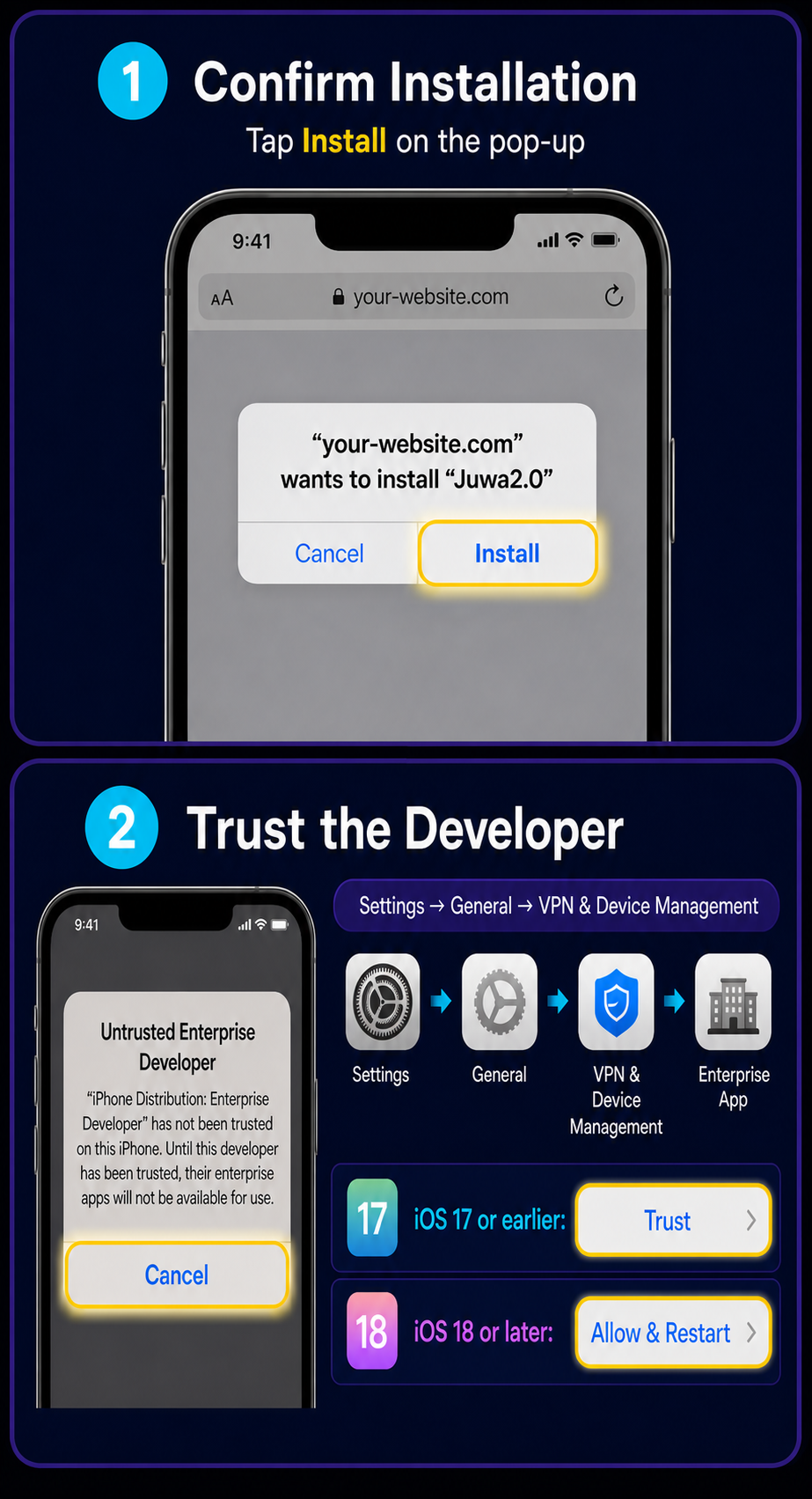
- Confirm installation: Tap Install on the system pop-up. iOS will download and install Juwa2.0 automatically.
- Trust the developer: Open Juwa2.0 after installation. If you see Untrusted Enterprise Developer, tap Cancel, then go to Settings → General → VPN & Device Management. On iOS 17 or earlier, tap Trust. On iOS 18 or later, tap Allow & Restart.
- Open Juwa2.0 and log in with the account sent to you in Messenger.
Continue on Your Phone
Please open this page on an Android phone, iPhone or iPad to see the correct installation instructions.
Up to $50
100% Cashback on Your First Deposit
Up to $100
Weekly Giveaway
Didn't receive an account? Register directly using the button below.
Register NowAlready received your account? Please use the Username and Password sent to you in Messenger.